

 Product
 Brand
Brand Articles
 Tools
Tools
A Comprehensive Guide to FPGA Development Boards
Quick answer
An FPGA development board is a ready-to-use platform built around a field-programmable gate array. It adds power regulation, configuration memory, a programming interface, clocks, user I/O, expansion connectors, and often external memory or processors. You use the board to design and test digital hardware without building a custom PCB first.
Choose the toolchain and device family before choosing the board. Then match the board to the job: a switch-and-LED trainer for digital-logic learning, an FPGA-only board with memory and expansion for custom datapaths, a SoC FPGA board for embedded Linux, or a vision and AI platform with camera interfaces and supported software stacks. Do not select by logic-cell count or price alone.
Important 2026 toolchain update
Two naming and licensing changes make older buying guides unreliable. AMD replaced the pre-2026 Vivado ML edition structure with tiered Vivado licensing beginning with Vivado 2026.1. The BASIC tier is available at no charge but requires an annually renewed license file, and device and feature coverage now depends on the selected tier. Verify that the exact device on a board is supported before buying it.
Altera is again the current company and product brand. It completed its transition to an independent FPGA company in 2025, while Intel retained a minority stake. Older boards and documents may still carry Intel FPGA or Intel Altera branding, but current software and product documentation are published by Altera. Quartus edition and device-family support must also be checked against the current release.
What Is an FPGA Development Board?
An FPGA contains configurable logic, routing, memory blocks, clocking resources, I/O cells, and often DSP or high-speed transceiver resources. Your HDL design is synthesized, placed, and routed into a configuration image that programs those resources. The resulting circuit operates as hardware: many blocks can run concurrently instead of sharing one instruction stream.
A development board surrounds the FPGA with the infrastructure needed to use it. A basic board may provide only a USB programmer, oscillator, flash memory, buttons, LEDs, and header pins. A larger board can add DDR memory, Ethernet, HDMI, PCIe, analog conversion, camera connectors, and an Arm processor subsystem. These additions often matter more to a project than the headline logic count.
A development board is primarily an evaluation and prototyping platform. If the design will become a product, also consider whether the chosen FPGA is available in a suitable package, whether the power rails and PCB stack-up are practical, and whether the vendor publishes the schematic, constraints, reference designs, and production guidance needed to migrate away from the board.
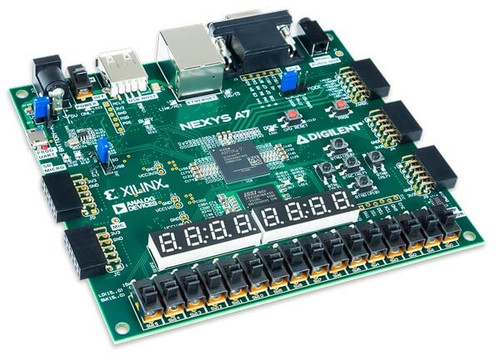
a Digilent Nexys A7 trainer board, not a generic FPGA package.
FPGA Development Board Components That Matter
The exact FPGA or SoC
Record the complete orderable device, not only the family name. Device size, package, speed grade, temperature grade, transceiver count, hard memory controllers, processor subsystem, and tool-license coverage can differ within one family. Confirm that the board definition and constraint files support that exact part.
Configuration and programming
An onboard USB-JTAG interface is convenient because it avoids a separate programming cable. Check how the FPGA boots without a host PC: QSPI flash, serial configuration memory, microSD, or another controller. On a SoC board, processor boot and FPGA configuration may be separate stages.
Memory
On-chip block RAM is fast but limited. Frame buffers, embedded Linux, large lookup tables, and data capture usually require external DDR, SDRAM, or SRAM. Memory capacity alone is not enough: confirm bus width, speed, controller support, reference designs, and which side of a SoC can access it.
I/O voltage and expansion
Count usable pins after subtracting clocks, memory, configuration, and onboard peripherals. Check the I/O-bank voltages and whether the expansion standard matches the hardware you plan to attach. A Pmod, Arduino-style header, Raspberry Pi header, FMC, HSMC, or generic GPIO header has different electrical and bandwidth limits. Never assume a connector is 5 V tolerant.
Clocks, reset, and power
Confirm the oscillator frequencies, clock-capable input pins, reset polarity, power-source requirements, and available current for expansion hardware. High-speed transceivers, large FPGAs, cameras, and processor subsystems may require active cooling or a dedicated power supply.
Documentation and examples
A strong board package includes a reference manual, schematic, master constraint file, board definition, programming instructions, example projects, and current tool-version notes. These resources determine how quickly you can move from an LED test to a reliable project.
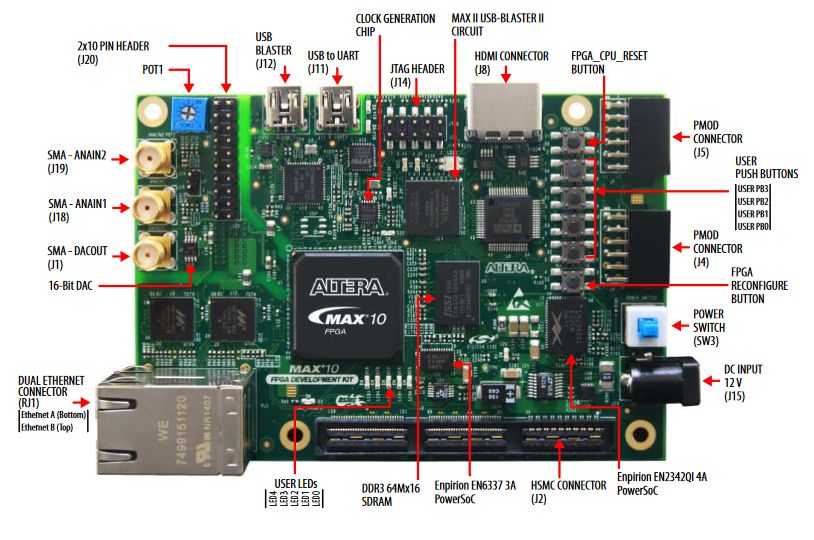
The annotated DE10-Nano illustrates how the FPGA or SoC is only one part of a complete development platform.
FPGA vs. Microcontroller: Which One Fits the Task?
An FPGA is not automatically faster than a microcontroller, and a microcontroller is not automatically lower power or cheaper at every system level. The correct choice depends on the workload, latency, interfaces, design volume, and engineering resources.
| Decision factor | FPGA | Microcontroller |
|---|---|---|
| Execution model | Custom concurrent hardware pipelines and state machines | Software running on one or more processor cores |
| Best fit | Deterministic parallel I/O, custom protocols, high-rate DSP, precise timing | Control logic, user interfaces, standard peripherals, low-complexity embedded tasks |
| Development work | HDL or HLS, simulation, timing constraints, synthesis, place and route | C/C++ or another language, firmware debugging, RTOS or bare-metal development |
| Latency | Can be fixed and cycle-deterministic when designed correctly | Depends on instruction flow, interrupts, caches, buses, and software |
| Power and cost | Highly design- and device-dependent | Often attractive for simple control, but system requirements decide |
Use an FPGA when the project requires many operations at once, exact cycle timing, unusual digital interfaces, or a hardware datapath that a processor cannot meet efficiently. Use a microcontroller when a standard peripheral set and sequential firmware can meet the timing requirement. Use a SoC FPGA when software and custom logic both have substantial roles. In many systems, an FPGA and microcontroller work together rather than compete.
How to Choose an FPGA Development Board
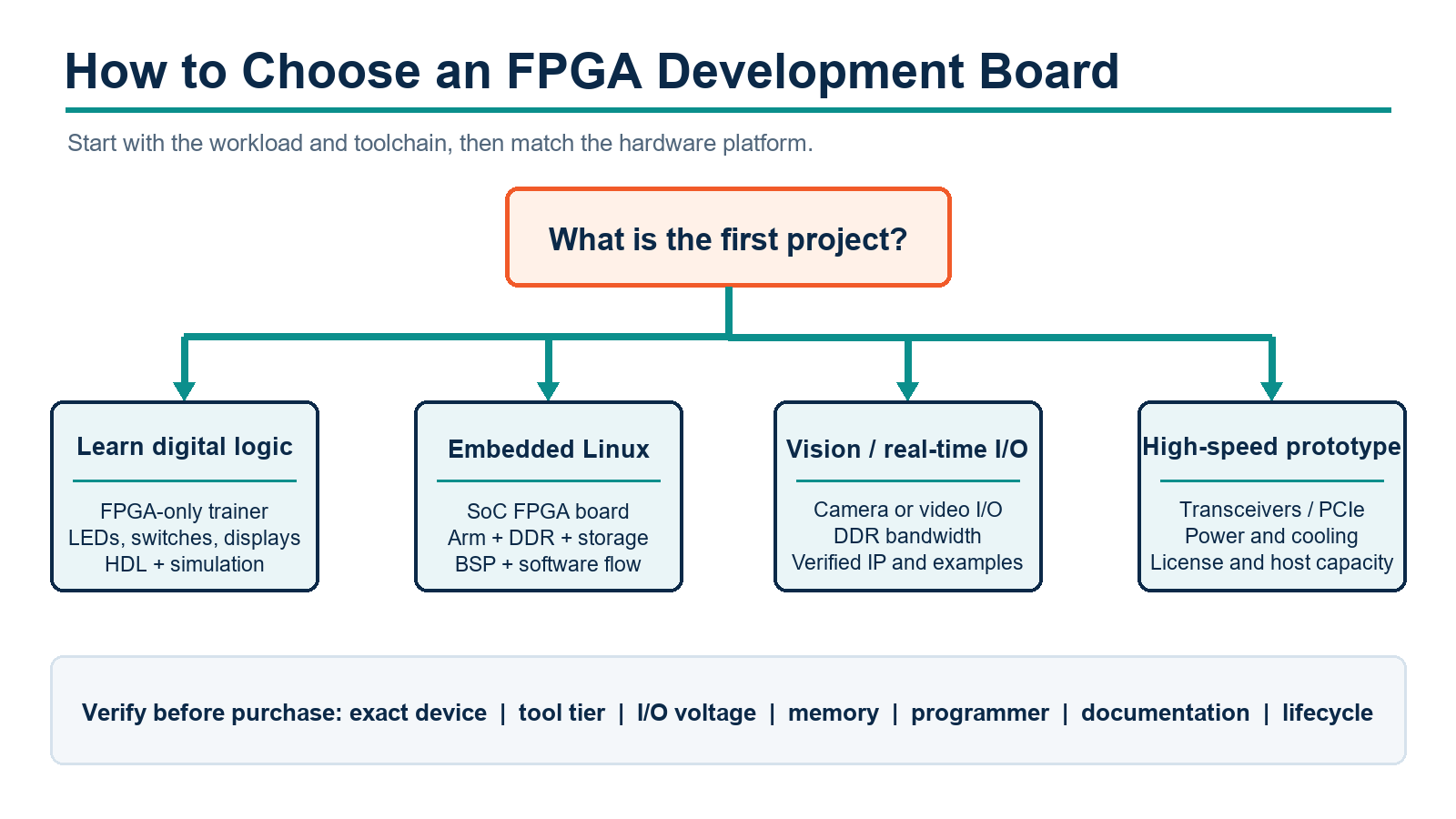
1. Define the first project
Write down the interfaces, data rates, latency, memory, clock domains, processor needs, and operating environment. “Learn FPGA” is too broad. “Build a UART receiver, drive a seven-segment display, and verify it in simulation” produces a much clearer board requirement.
2. Choose the vendor ecosystem and tool release
The board determines which synthesis, implementation, programming, debug, and embedded-software tools you will use. Confirm the current license tier, supported operating systems, device coverage, download availability in your region, and approximate installation size before purchasing hardware.
3. Decide between FPGA-only and SoC FPGA
An FPGA-only board is usually clearer for learning synchronous logic, state machines, datapaths, and timing constraints. A SoC FPGA adds hard processor cores, boot software, memory maps, operating-system images, and hardware-software interfaces. That is valuable for embedded Linux and acceleration, but it increases setup complexity.
4. Budget the logic and memory honestly
Estimate LUTs, flip-flops, block RAM, DSP blocks, clock resources, and transceivers from a representative design. Leave margin for debug cores and iteration. More capacity is useful only if the selected tool tier supports the device and compile times remain practical on your computer.
5. Match the physical interfaces
Check whether the board includes the interfaces you need or exposes enough compatible I/O to add them. HDMI labels do not always mean identical source and sink capability. Camera connectors can differ in pinout and signaling. Ethernet may require vendor IP, a soft processor, or a specific example design.
6. Verify the complete bill of materials
Check whether the package includes the correct power supply, USB cable, microSD card, camera, programming cable, and expansion adapter. Some starter kits deliberately omit accessories. Include required licenses and cables in the total project cost.
7. Check lifecycle and revision notes
Confirm that the exact board variant is active. A product page may list retired variants beside active ones. Read product-change notices because memory and Ethernet components can change between revisions even when the board name remains the same.
8. Read the first tutorial before buying
Open the current getting-started guide and make sure you can complete the required installation, board connection, device selection, constraints, bitstream generation, and programming steps. This catches tool or operating-system incompatibility before it becomes an expensive surprise.
Current FPGA Development Board Examples by Use Case
The following examples are a use-case shortlist, not a universal ranking. Availability, pricing, tool licenses, and board revisions change. Verify them with the manufacturer immediately before purchase.
Digital logic fundamentals: Digilent Basys 3
The Basys 3 remains a straightforward AMD Artix-7 teaching platform. Its onboard switches, LEDs, pushbuttons, seven-segment display, VGA output, USB-JTAG, and Pmod connectors let a beginner complete many labs without extra hardware. It is a better first choice than a complex SoC board when the goal is to learn HDL, simulation, constraints, and synchronous design.
Larger classroom and processor projects: Digilent Nexys A7
The Nexys A7-100T adds a larger Artix-7 device, external DDR2, Ethernet, microSD, sensors, audio, VGA, and extensive user I/O. It suits computer architecture courses, custom processors, memory controllers, and projects that outgrow a basic trainer. Do not confuse the active 100T model with the retired 50T variant.
FPGA-only embedded prototyping: Digilent Arty A7-100T
The Arty A7-100T emphasizes expansion and embedded prototyping through Pmod and Arduino-style connectors, Ethernet, external memory, and MicroBlaze support. The older Arty A7-35T variant is retired, so confirm that tutorials and constraints target the 100T board you are actually buying.
Embedded Linux and video: Digilent Zybo Z7
The Zybo Z7 combines a dual-core Arm Cortex-A9 processor with Zynq-7000 programmable logic. DDR3L, Ethernet, USB, microSD, HDMI input and output, audio, Pmod expansion, and a MIPI camera connector make it useful for hardware-software co-design and embedded vision. Choose between the Z7-10 and Z7-20 only after checking programmable-logic resources and connector differences.
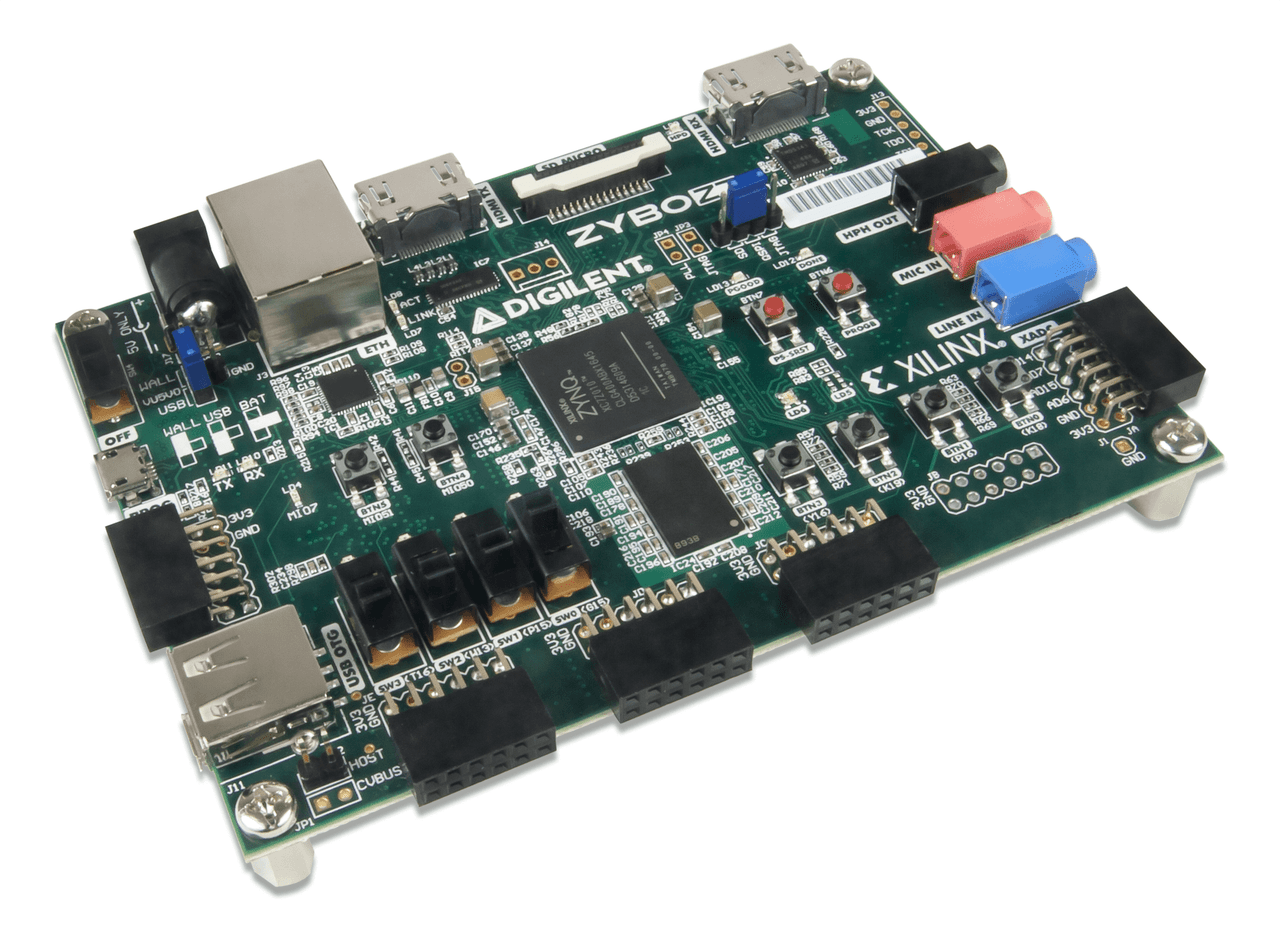
Digilent Zybo Z7, a Zynq-7000 Arm and FPGA development board.
Python-controlled overlays: PYNQ-Z2
The PYNQ-Z2 is useful when software developers want to control prebuilt programmable-logic overlays from Python and Jupyter notebooks. PYNQ reduces friction at the software interface, but it does not remove hardware design from custom accelerators. Creating or deeply modifying an overlay still requires an FPGA design flow, HDL, HLS, or reusable IP plus timing and interface verification.
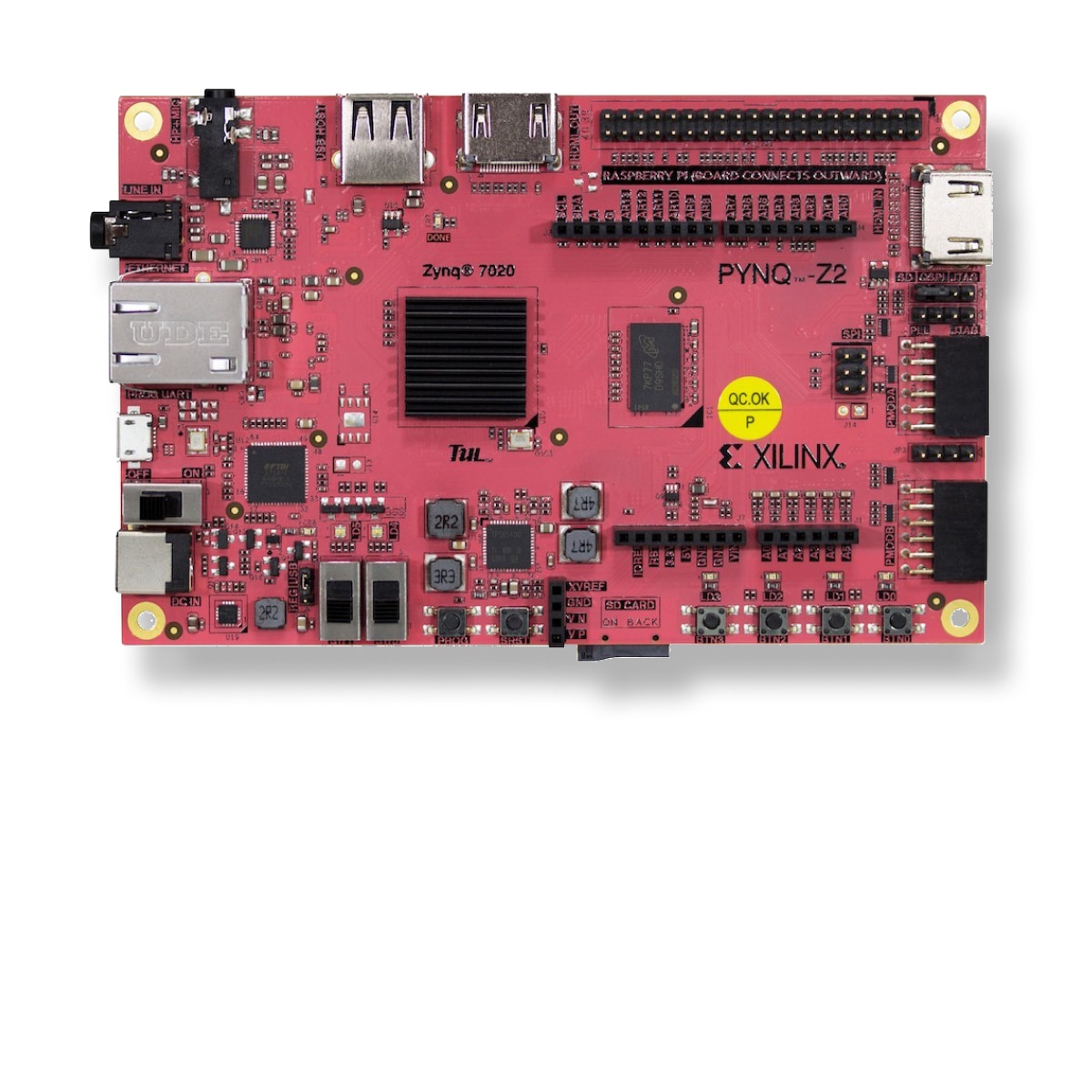
the PYNQ-Z2 board used with the open-source PYNQ software framework.
Altera SoC and embedded Linux: Terasic DE10-Nano
The DE10-Nano remains available as a Cyclone V SoC platform with programmable logic and a dual-core Arm Cortex-A9 hard processor system. It provides DDR3, microSD, Ethernet, USB, HDMI output, Arduino-style expansion, and two 40-pin headers. It is useful for learning the Altera SoC flow, but buyers should verify Quartus support, board revision, and the age of any Linux image or tutorial they intend to follow.
Compact Gowin experiments: Sipeed Tang Nano 20K
The Tang Nano 20K is a small Gowin-based board with onboard programming, SDRAM, HDMI, a display connector, flash, and approximately 20K four-input LUTs. It can be attractive for compact display, soft-core, and retro-computing experiments. Treat its Gowin toolchain, documentation depth, voltage levels, and community examples as part of the selection, not as afterthoughts.
Small low-power FPGA evaluation: Lattice iCE40 UltraPlus Breakout Board
The iCE40 UltraPlus Breakout Board exposes the I/O of an iCE40UP5K and includes USB programming, flash, switches, and an LED demonstration. It is suited to evaluating a compact FPGA and simple custom interfaces rather than replacing a peripheral-rich classroom trainer.
Current mid-range professional SoC evaluation: Altera Agilex 5 E-Series 013B
The Agilex 5 E-Series 013B Development Kit targets advanced embedded and compute prototypes. It combines an Agilex 5 SoC FPGA with LPDDR4, DisplayPort, MIPI, Ethernet, USB, optional PCIe, Pmod, and Raspberry Pi HAT expansion. This is not a beginner trainer: power, cooling, Quartus edition, device support, and the host computer required for large builds must be planned first.
Vision and edge AI: AMD Kria KV260
The Kria KV260 Vision AI Starter Kit is a Zynq UltraScale+ MPSoC platform built around a Kria K26 SOM and a vision-focused carrier. It provides MIPI camera interfaces, USB cameras, HDMI, DisplayPort, Ethernet, and supported acceleration flows. It is appropriate when the objective is a vision application and a path toward a production SOM, not when the objective is merely to learn flip-flops and finite-state machines.
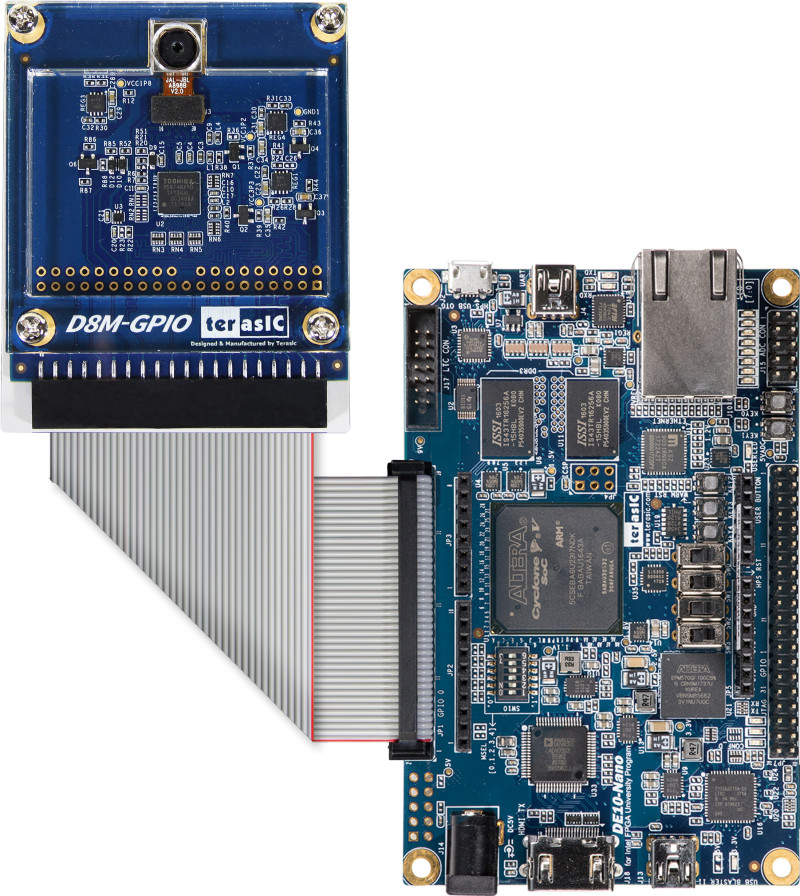
an example of a camera-connected FPGA prototype. Verify the specific camera connector and electrical interface for the selected board.
FPGA Toolchains and Licensing in 2026
AMD Vivado and Vitis
Vivado handles HDL design entry, synthesis, implementation, timing analysis, bitstream generation, simulation, and hardware debug for supported AMD devices. Vitis covers embedded software and higher-level development flows. Beginning with Vivado 2026.1, AMD uses BASIC, CORE, PRO, ENTERPRISE, and GOLD tiers. BASIC is a zero-cost node-locked annual license, but feature and device limits apply. Older product pages that say “free WebPACK” or “free Standard edition” may describe the pre-2026 licensing model.
Altera Quartus Prime
Quartus Prime provides synthesis, fitting, timing analysis, programming, Platform Designer, and device-specific tools for Altera FPGAs and SoCs. Lite, Standard, Pro, and embedded offerings do not support identical devices or features. Use the current Altera device-support table to check a Cyclone, MAX, Arria, Stratix, or Agilex part before choosing a software edition.
Lattice and Gowin tools
Lattice boards use tools such as Radiant, Diamond, or iCEcube2 depending on the family. Gowin boards use the Gowin EDA flow, while community projects may support selected devices through open-source tools. Confirm that the exact device, programmer, operating system, IP block, and debug flow are supported; family-level compatibility is not enough.
Host-computer requirements
FPGA tools can require substantial storage and memory, and implementation time grows with device size and design complexity. Check the current operating-system matrix and hardware recommendations. A board that looks inexpensive can be a poor fit if its supported tool version will not run on the available workstation.
A Practical FPGA Learning Path
Combinational logic: implement gates, multiplexers, decoders, and a seven-segment display; verify them in simulation before programming the board.
Synchronous logic: build counters and finite-state machines, understand clock edges, and avoid using pushbuttons as clocks.
Constraints: learn pin assignments, I/O standards, primary clocks, generated clocks, and timing exceptions. A design is not complete because a bitstream was generated.
Clock-domain crossing: synchronize control signals and use appropriate FIFOs or handshakes for multi-clock data paths.
Standard interfaces: add UART, SPI, I2C, PWM, or a display interface and test protocol timing with simulation and a logic analyzer.
Memory and streaming: use block RAM, FIFOs, DMA, and external memory only after the small design is stable.
Hardware-software co-design: move to a soft processor or SoC FPGA when the project genuinely benefits from software plus custom logic.
For an AMD board, start with the board maker's current Vivado project and constraint files. For a DE10-Nano, use the current Terasic manual and a Quartus version that supports Cyclone V. For PYNQ, begin with a supported prebuilt image and overlay before attempting to build a custom one.
Common FPGA Board Buying Mistakes
Buying by logic count: a larger FPGA does not compensate for missing memory, the wrong connector, unsupported transceivers, or an unaffordable tool tier.
Ignoring the exact variant: one board family can contain active and retired models with different FPGA sizes and constraints.
Assuming Python replaces FPGA design: Python can control overlays, but custom programmable logic still requires a hardware development flow.
Using stale tutorials: screenshots, menu paths, board files, license names, and operating-system support can change between tool releases.
Forgetting electrical limits: connector shape does not guarantee voltage, current, pinout, or protocol compatibility.
Ignoring accessories: verify the power adapter, programming interface, cables, storage, camera modules, and cooling included with the kit.
Expecting the evaluation board to be production hardware: plan how the design will migrate to a module or custom PCB, including device lifecycle and supply.
Frequently Asked Questions
What is the best FPGA development board for a beginner?
There is no universal best board. For learning HDL and digital logic, choose an FPGA-only trainer with switches, LEDs, a built-in programmer, current documentation, and a device supported by an accessible tool tier. Basys 3 is one current example. Choose a SoC board only when embedded software or Linux is part of the learning objective.
Do I need Verilog or VHDL?
You need a hardware-design method. Verilog, SystemVerilog, and VHDL are common. HLS and graphical tools can generate hardware from higher-level descriptions, but timing, interfaces, resource use, and verification still require hardware reasoning. PYNQ can control existing overlays from Python; it does not make arbitrary custom logic appear without an overlay design.
Can an FPGA development board run Linux?
An FPGA-only device normally needs a soft processor and sufficient memory to run an operating system. SoC FPGA boards such as Zynq-7000, Zynq UltraScale+, Cyclone V SoC, or Agilex SoC platforms contain hard processor subsystems better suited to embedded Linux. Check for a current board support package and boot-image workflow.
Is an FPGA faster than a microcontroller?
Only for suitable workloads and designs. An FPGA can implement many parallel operations with deterministic latency, but a microcontroller may complete a control task more simply, with less engineering effort and lower system cost. Compare the actual deadline, throughput, interfaces, and development resources.
How much FPGA capacity should I buy?
Compile a representative design when possible, then add margin for growth and debug. Consider LUTs, flip-flops, block RAM, DSP blocks, PLLs, I/O banks, and transceivers. Capacity that requires a higher software tier or impractical compile time may not be useful.
Should I choose a board with a camera or HDMI connector?
Choose it only if the complete video path is documented. Check whether HDMI is input, output, or both; identify resolution and clock requirements; verify the camera pinout and voltage; and confirm that reference designs, IP, memory bandwidth, and software support exist for the intended mode.
Can I use an old Spartan-6 development board with current Vivado?
No. Current Vivado supports AMD 7 Series and newer families, while Spartan-6 remains tied to the legacy ISE tool flow. An older board can still be useful for maintaining an existing design, but it is usually a poor starting point for a new learner who wants a current toolchain.
Conclusion
The right FPGA development board is the one that removes risk from a clearly defined first project. Start with the supported toolchain and exact FPGA, then verify memory, I/O voltage, connectors, programming, documentation, operating-system support, licensing, accessories, and lifecycle. A smaller well-documented board often produces more progress than a powerful kit whose software or interfaces do not match the task.
For digital-logic learning, favor a simple FPGA-only trainer. For embedded Linux, choose a supported SoC FPGA platform. For vision, AI, networking, or high-speed data, work backward from interfaces, memory bandwidth, IP availability, and deployment path. Recheck the vendor pages immediately before purchase because prices, licenses, board revisions, and availability can change.
Engineering References
 UTMEL
UTMEL
We are the professional distributor of electronic components, providing a large variety of products to save you a lot of time, effort, and cost with our efficient self-customized service. careful order preparation fast delivery service
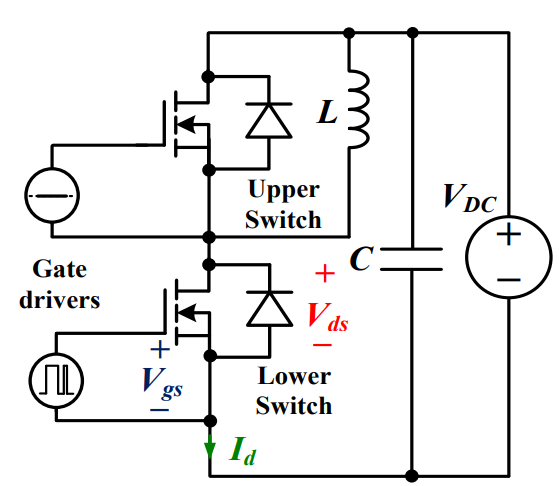 Discovering New and Advanced Methodology for Determining the Dynamic Characterization of Wide Bandgap DevicesSaumitra Jagdale15 March 20242875
For a long era, silicon has stood out as the primary material for fabricating electronic devices due to its affordability, moderate efficiency, and performance capabilities. Despite its widespread use, silicon faces several limitations that render it unsuitable for applications involving high power and elevated temperatures. As technological advancements continue and the industry demands enhanced efficiency from devices, these limitations become increasingly vivid. In the quest for electronic devices that are more potent, efficient, and compact, wide bandgap materials are emerging as a dominant player. Their superiority over silicon in crucial aspects such as efficiency, higher junction temperatures, power density, thinner drift regions, and faster switching speeds positions them as the preferred materials for the future of power electronics.
Read More Applications of FPGAs in Artificial Intelligence: A Comprehensive GuideUTMEL29 August 20255563
This comprehensive guide explores FPGAs as powerful AI accelerators that offer distinct advantages over traditional GPUs and CPUs. FPGAs provide reconfigurable hardware that can be customized for specific AI workloads, delivering superior energy efficiency, ultra-low latency, and deterministic performance—particularly valuable for edge AI applications. While GPUs excel at parallel processing for training, FPGAs shine in inference tasks through their adaptability and power optimization. The document covers practical implementation challenges, including development complexity and resource constraints, while highlighting solutions like High-Level Synthesis tools and vendor-specific AI development suites from Intel and AMD/Xilinx. Real-world applications span telecommunications, healthcare, autonomous vehicles, and financial services, demonstrating FPGAs' versatility in mission-critical systems requiring real-time processing and minimal power consumption.
Read More The 2026 Engineer’s Guide: Choosing the Right MCU for Your Next IoT & New Energy ProjectUTMEL30 April 20261827
A comprehensive comparison of 2026's leading MCUs from ST, NXP, and Microchip across power efficiency, processing performance, connectivity, and ecosystems to help engineers select the optimal chip for next-gen IoT and new energy projects.
Read More AI Server Components: Engineering Next-Gen Data Center Hardware for 100kW RacksUTMEL15 May 2026995
The transition from traditional enterprise IT to AI-driven workloads has rendered legacy data center hardware obsolete, forcing infrastructure planners to re-engineer server components for extreme thermal environments.
Read More The Practical Engineer’s Guide to the NE555N Timer: Pinout, Setup, and TroubleshootingUTMEL29 May 2026783
This comprehensive guide explores the NE555N timer, detailing its 8-pin layout, internal architecture, and key datasheet specifications. It compares the bipolar IC to CMOS variants and details setup configurations for astable, monostable, and bistable modes. Additionally, the guide offers practical troubleshooting advice to prevent common breadboard failures, such as floating reset pins and electrical noise issues.
Read More
Subscribe to Utmel !
![HCS360/P]() HCS360/P
HCS360/PMicrochip Technology
![AD8232ACPZ-RL]() AD8232ACPZ-RL
AD8232ACPZ-RLAnalog Devices Inc.
![AD9173BBPZ]() AD9173BBPZ
AD9173BBPZAnalog Devices Inc.
![ATA663254-GBQW]() ATA663254-GBQW
ATA663254-GBQWMicrochip Technology
![ATECC108A-RBHCZ-T]() ATECC108A-RBHCZ-T
ATECC108A-RBHCZ-TMicrochip Technology
![HCS362T-I/ST]() HCS362T-I/ST
HCS362T-I/STMicrochip Technology
![AT88SC12816C-PU]() AT88SC12816C-PU
AT88SC12816C-PUMicrochip Technology
![FM3164-GTR]() FM3164-GTR
FM3164-GTRCypress Semiconductor Corp
![FOD4116]() FOD4116
FOD4116ON Semiconductor
![HCS301/P]() HCS301/P
HCS301/PMicrochip Technology


